Pavel Guzhikov
apps@guzh.uk
Always Today app icon: an amber half-sun with a tick cut out of it, rising over a horizon, on a dark brown square.
Always Today

What am I doing today?

A calm to-do list that answers that one question every morning. Your lists live on your device and work offline, and they sync across your phone, your Googlebook, your Windows PC, your Mac and your Linux terminal when you want them to.

Type a to-do the way you would say it, “call bank tomorrow 3pm #admin”, and it lands in the right list with its day, time and tag. Today, Upcoming, Anytime, Someday and a Logbook; areas and projects with headings; repeats that never double up; reminders; and a quiet line under Today that marks each thing as you finish it. Optional end-to-end encryption, and no ads, no analytics and no tracking.

  • Free Every feature on one device, for ever. No account needed £0
  • Sync, yearly Your lists on every device you sign in on £24 a year
  • Sync, monthly The same sync, paid month by month £3 a month
  • Lifetime Sync for as long as the service runs, paid once £59

UK prices, VAT included. Every new account gets 14 days of sync free, no card needed. Always Today is in its last round of testing: Google Play, Windows, Mac and Linux are coming soon, and an iPhone and iPad version is on its way.

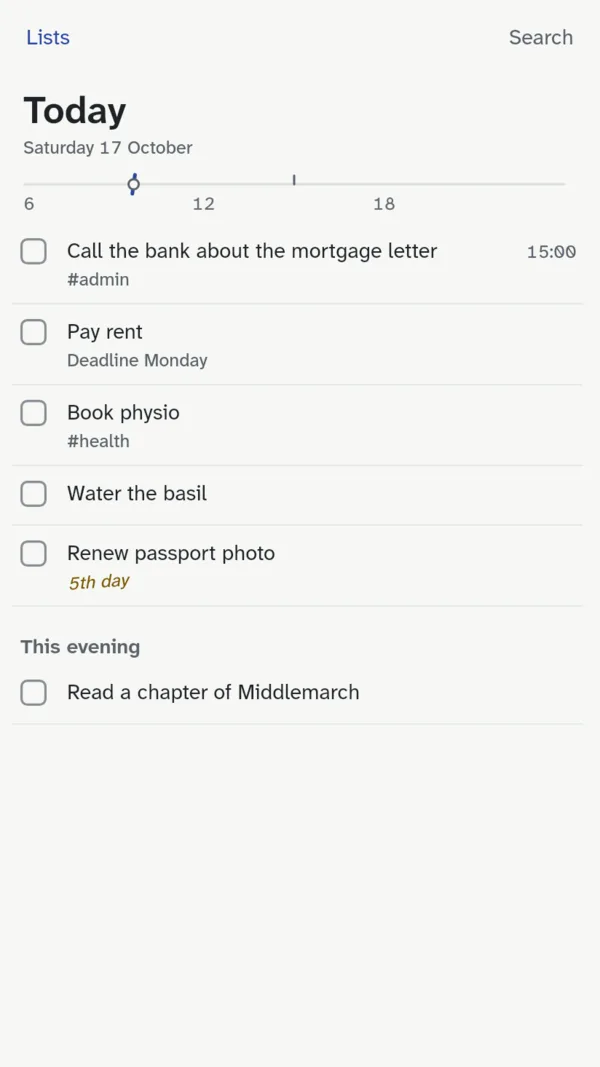
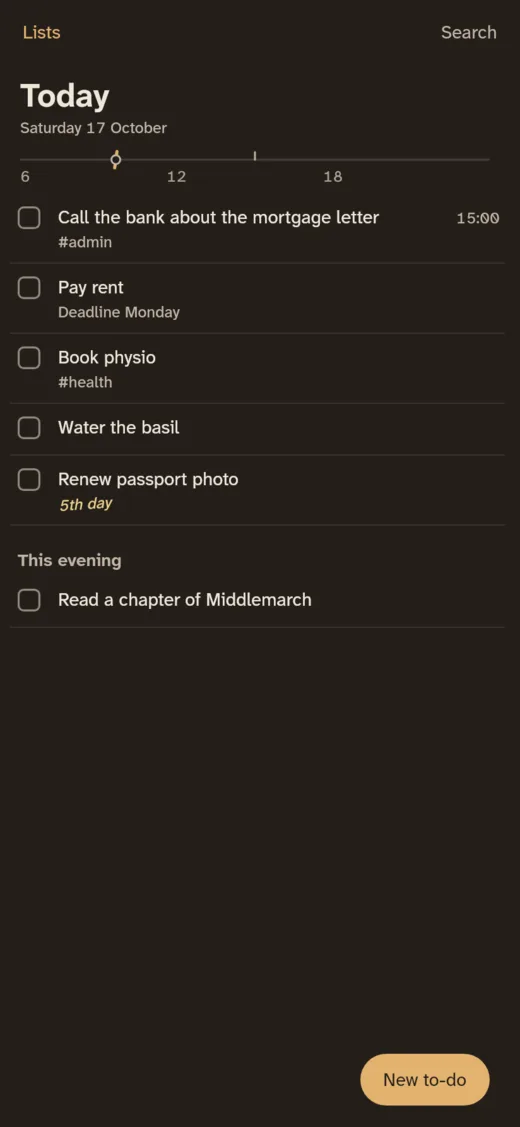
Today on an Android phone: five to-dos with a time, a deadline and tags, a quiet “5th day” note on one carried over, This evening below, and the day's line under the date.
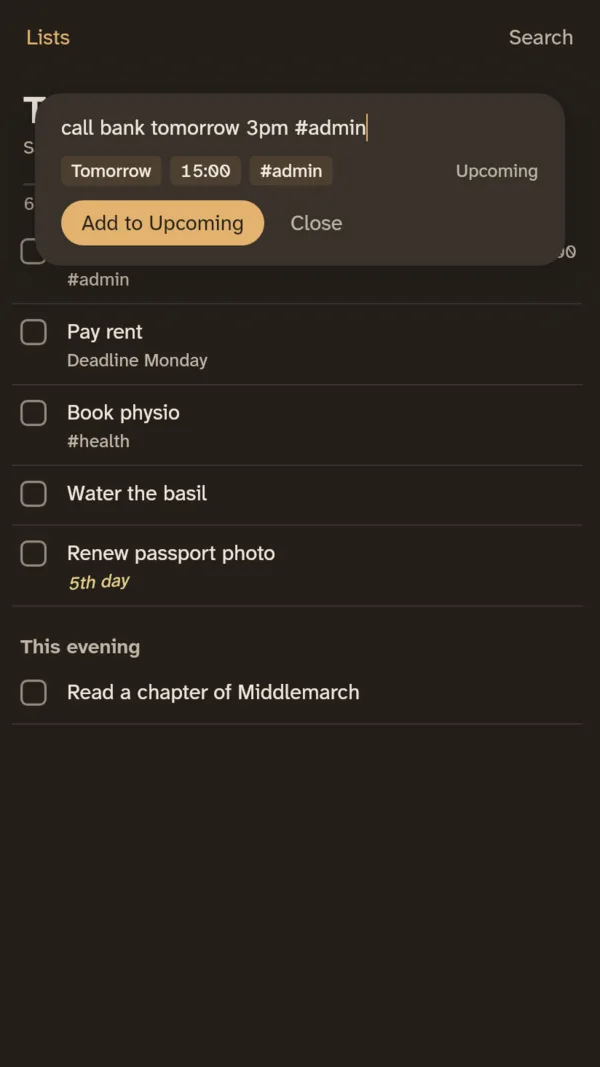
Quick entry in dark mode: “call bank tomorrow 3pm #admin” typed, with what it understood shown as Tomorrow, 15:00 and #admin, and the button Add to Upcoming.
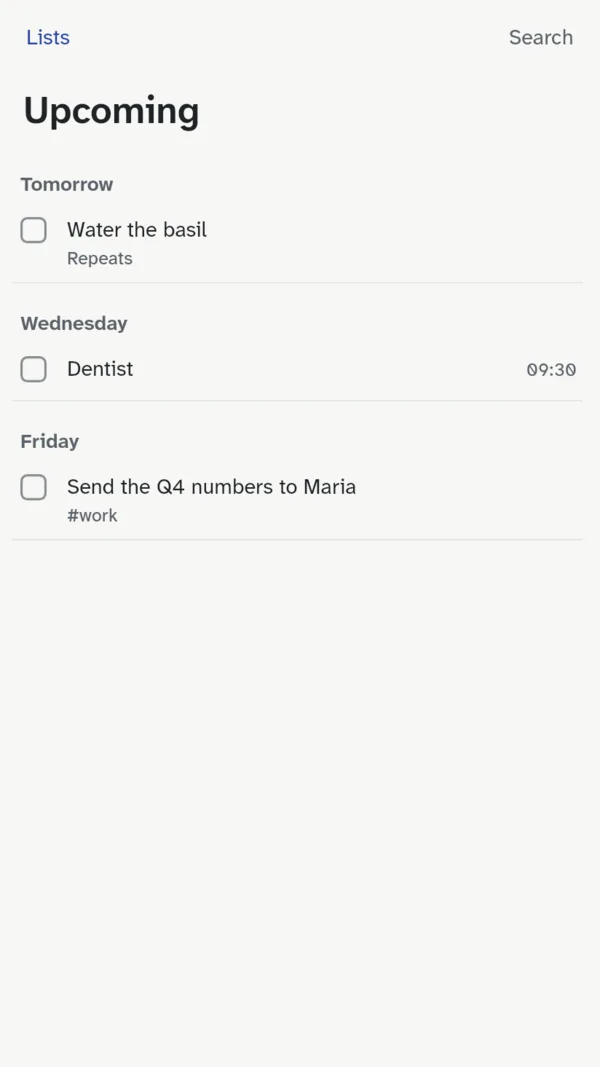
Upcoming: the days ahead as headings, Tomorrow with a repeating to-do, Wednesday with the dentist at 09:30, and Friday with a to-do tagged work.

One list, on every screen you have

The same lists and the same keys everywhere, so what your hands learn on one device works on the next. Each device keeps its own full copy, so nothing waits for the network.

Google Play

Android phone and Googlebook

On the phone, a home-screen widget, reminders and sharing from other apps. On a Googlebook it behaves like a desktop: two panes, keyboard shortcuts, right-click menus and windows you can resize.

  • Google Play Coming soon
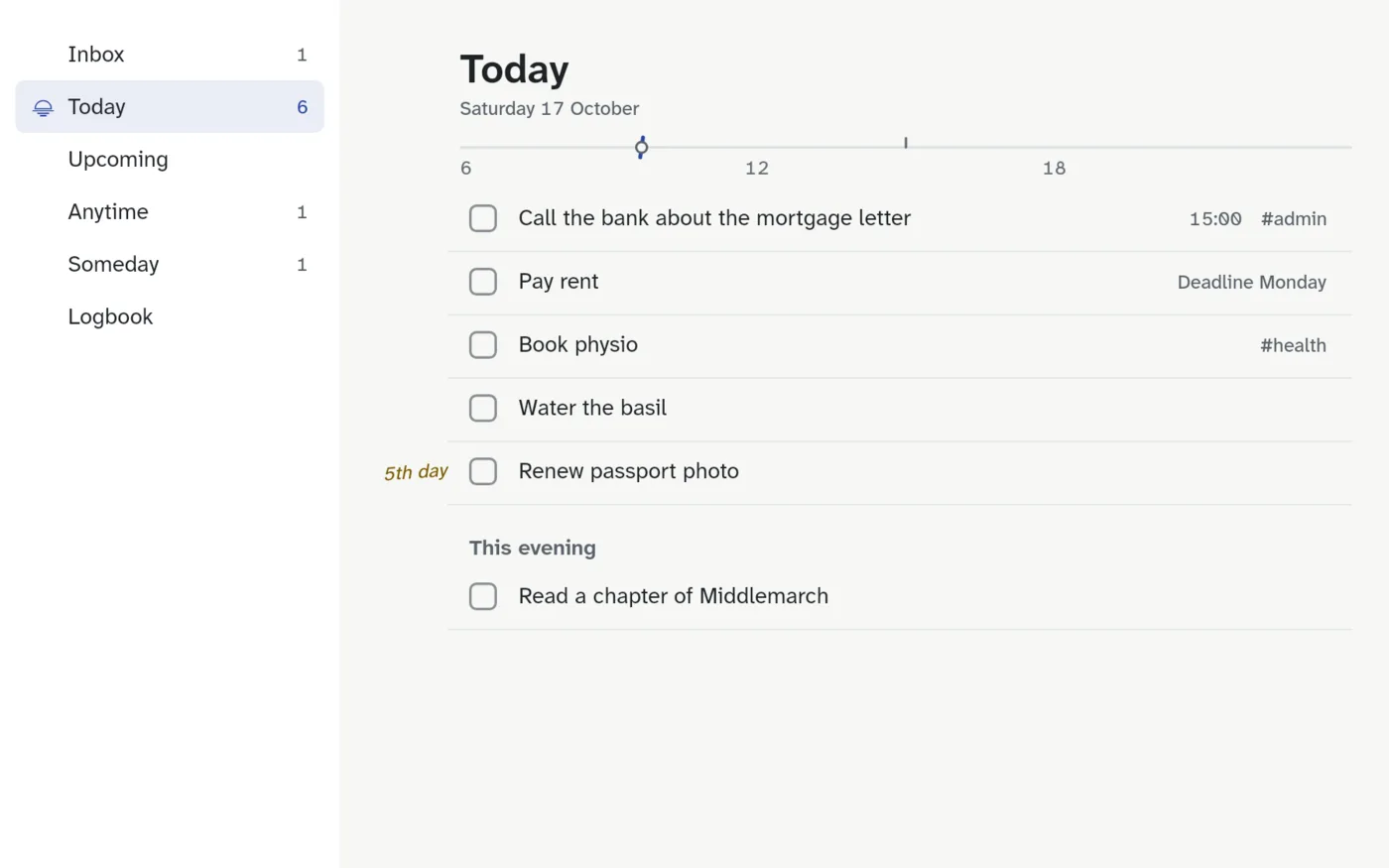
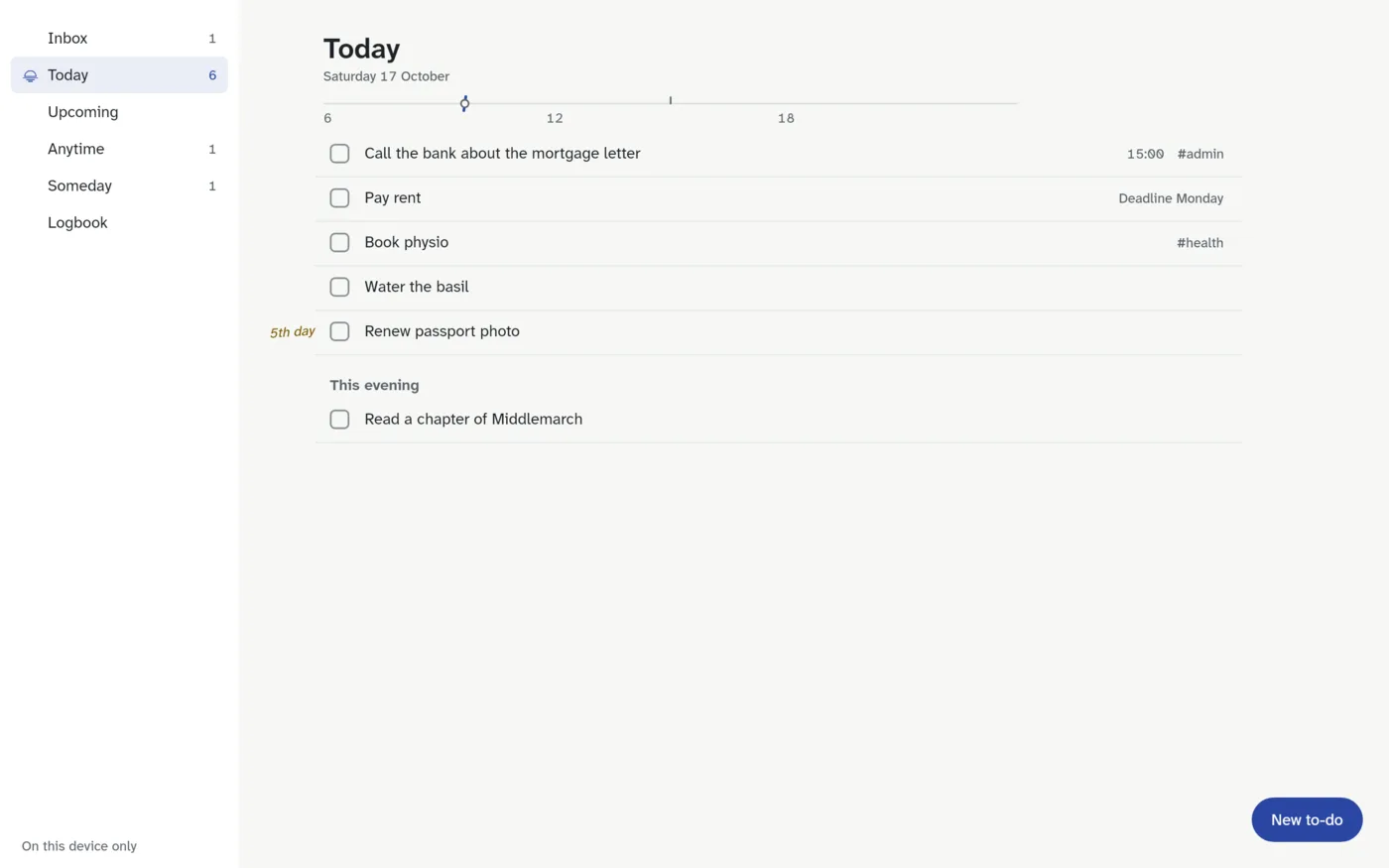
Always Today on a Googlebook: the lists on the left and Today on the right, with its line under the date.
Always Today on an Android phone in dark mode: Today with five to-dos and This evening.

Windows 11

Windows PC

A global shortcut, Ctrl Alt Space, opens quick entry from anywhere, and the tray icon keeps it a click away. Plans are bought in Stripe's secure checkout, in your browser.

  • Windows installer Coming soon
Always Today on a Windows PC: the lists down the side, and Today with to-dos, a time, a deadline, tags, a note on one carried over for five days, and the day's line marking now.

macOS

Mac

Close the window and it waits in the menu bar, with quick entry a click away; click its Dock icon and Today is back. One plan covers every device you sign in on, bought in Stripe's secure checkout in your browser. For Macs with Apple silicon.

  1. Open the download
  2. Drag Always Today into Applications
  3. Open it from Applications
  • Mac download Coming soon
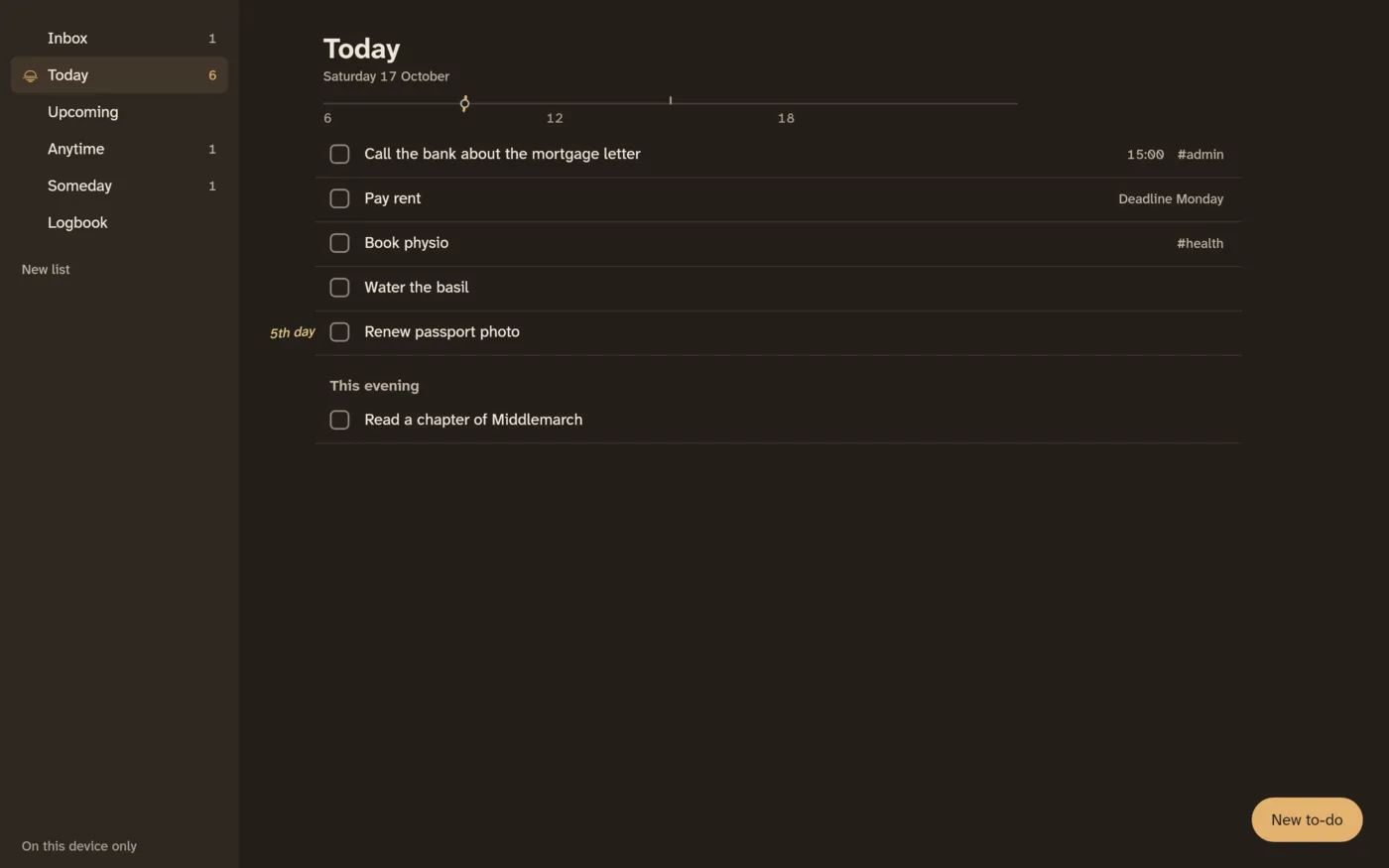
Always Today on a Mac in dark brown: the lists down the side, and Today with to-dos, a time, a deadline, tags and the day's line marking now.

Terminal

Linux, made on Omarchy

A fast native terminal app that starts at once and takes your terminal's colours, so it matches every Omarchy theme. Keys feel like Vim. The same program adds to-dos from scripts, puts Today in your bar and opens a one-line capture prompt in a floating window.

  • Arch Linux package Coming soon
╭─ Lists ────────────╮╭─ Today ────────────────────────────────────────────────╮
│  Inbox           1 ││ Saturday 17 October                                    │
│ ▌Today           5 ││ ───────────────○────────────────────────────────────── │
│  Upcoming          ││                                                        │
│  Anytime           ││ ▌       [ ] Call the bank about the mortgage letter    │
│  Someday           ││         [ ] Pay rent                   due Mon 19 Oct  │
│  Logbook           ││         [ ] Book physio                  1/2  #health  │
│                    ││ 4th day [ ] Renew passport photo                       │
│  Home              ││                                                        │
│    Kitchen refit   ││ This evening                                           │
│  Work              ││         [ ] Read a chapter of Middlemarch              │
╰────────────────────╯╰────────────────────────────────────────────────────────╯
 ? keys   / search   : command   o add   x complete         On this device only
Free
on one device, for ever, with every feature and no account
£24 a year
for sync on every device, or £3 a month, or £59 once for Lifetime
14 days
of sync free with every new account, and no card needed
Zero
ads, analytics and trackers, by design rather than by promise
01 Local first

Your lists live on your device

Everything works offline and opens at once. Sign in with just your email to sync, and a change reaches your other devices when they next open, or within a few minutes while they're open. Two devices editing different parts of the same to-do both keep their changes.

02 Plain words

Type it the way you say it

  • “call bank tomorrow 3pm #admin”
  • “pay rent every 3 months on the 1st”
  • “report due friday 5pm”
  • “dentist 21/10 at 9:30”, with UK dates, day first

It shows what it understood as you type, before you press Enter.

03 Private by design

It knows your day, nobody else does

  • No account needed on one device
  • Optional end-to-end encryption: the server stores only what it can't read
  • No ads, no analytics, no tracking
  • Export everything as a file at any time

Read the privacy policy

Questions

Is Always Today free?

Yes, on one device, for ever: every list, quick entry, repeats, reminders, import and export. You pay only if you want your lists to sync between devices: £24 a year, £3 a month, or £59 once for Lifetime. Every new account gets 14 days of sync free, with no card needed.

How do I buy a plan, and who sells it?

From inside the app. On Windows, Mac and Linux it opens Stripe's secure checkout in your browser; Stripe sells the plan through its Managed Payments service, shown on your receipt as Onelink. On Android you buy through Google Play. A plan belongs to your Always Today account, so it works on every device you sign in on, wherever you bought it.

Can I get a refund?

Yes: refunds within 14 days, no questions asked, on top of your legal rights. The help page explains how, for the web and for Google Play.

Do I need an account?

No. Without one, everything stays on your device. An account, just your email address with no password, is only needed to sync.

Can the sync server read my to-dos?

Not if you turn on end-to-end encryption: your devices encrypt every change before it leaves, with a passphrase only you know. Without it, your lists are stored on the server as written, protected in transit and at rest, and never read, sold or analysed.

Can I bring my lists from Things, Todoist or TickTick?

Yes. Always Today imports their exports and shows you what it found before adding anything. You can export everything as a JSON file at any time.